
Files (3)
Choose the needed variant and slice it; source file size is not printable volume.
Use the slicer's filament total; STL/3MF byte size is not a cost input.
Slice with the recommended material, infill, orientation, and supports.
| STL file | Role | Source size | TPU / PETG 20% | TPU / PETG 25% | 100% solid | Recommendation |
|---|---|---|---|---|---|---|
| Model_3_USB_Cubby.stl | Accessory piece | 9.9 KB STL | Slice file | Slice file | Slice file | Small functional file: print slowly; consider 80–100% infill for durability. |
| Model_3_USB_Cubby_no_bottom.stl | Accessory piece | 23.0 KB STL | Slice file | Slice file | Slice file | Small functional file: print slowly; consider 80–100% infill for durability. |
| Model_3_USB_Cubby_no_bottom_no_sides.stl | Accessory piece | 15.9 KB STL | Slice file | Slice file | Slice file | Small functional file: print slowly; consider 80–100% infill for durability. |
Saved setup guidance is used for material, infill, support, and per-file recommendation text; editable numbers are planning estimates only.
Tesla Model 3 USB Cubby

Shared by
3DPrintedCarPartDescription
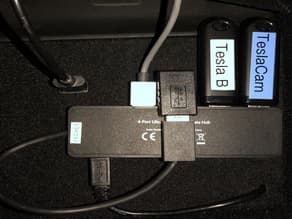
I wanted to tidy-up my USB hub and thumb drives as well as hide them from anyone horrible enough to break into my car, so I made this. It doesn't fit flush against the back as I'd designed - the wires want to bend and push it out. However I got the top to stay flush against the back, and you don't notice that the bottom is poking out by ~1cm or so, so at this point, it's good enough for me (and probably many of you). I may refine it further at some point in which case I'll update it here. Installation is a little tricky because the width of the back wall with the USB ports is a bit wider than the space in front. With everything unplugged, try to insert it top-down to get a feel for how it fits before you try to make it work with the wiring. I printed in PETG and it flexed just enough for me to work it into place. TPU might be a better choice. I suggest you print it in black (though my friend with a red TM3 wants a red one) and optionally flock it or put some felt on the front if you really want it to look authentic. I'm thinking of using felt with slots cut out for the USB cords so the felt will cover up most of the USB holes after the cable is pushed through. I tried to get this out there in time for the holidays - if you've got a friend with a Model 3 this would be a great gift! Update: Forgot to add that you’ll probably need something like this right angle USB adapter to make the USB port supplying the hub face down instead of out: https://www.amazon.com/gp/aw/d/B07QYS3FD8 Update 2: Added some new photos showing better cable management that allows the cubby to fully slide into place. Also put black felt on the face of the cubby. Definitely recommend printing in TPU if you can - the flexibility comes in handy when you're trying to place it. But other filaments can probably work with enough struggling. Update 3: I realized it doesn't need a bottom, so I removed it, which might make installing it and dealing with the cables a little easier. I also created a version with no sides, which might also ease installation, particularly if you're not printing it in a soft material like TPU. I've added both STLs.
Compatible Cars
Originally published on thingiverse.com by Fred Hamilton (Yonkiman) · License: CC BY
Share whether this print actually fits a real car. Installed photos and material notes make the catalog more trustworthy.
Related Parts
Most specific car + model + year + category matches first, with popular parts mixed in.

Tesla Model 3 umbrella holder
License: CC BY
View & download STL files
Tesla model 3 box for holding sunglasses
License: CC BY
View STL source
Telsa Model 3 Tissue Box Holder
License: CC BY-NC-SA
View STL source
Arm Rest Console Tray for Tesla Model 3 MY21
License: CC BY-NC-SA
View STL source
Tesla J1772 Adapter Trunk Holder for Model 3/Model Y
License: CC BY
View & download STL files
BMW X5 E70 Center Console Blind Plate
BMW
License: CC BY
View & download STL files
