
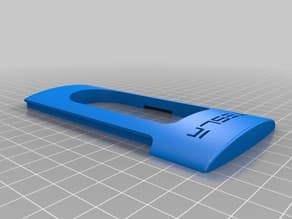
Files (12)
Choose the needed variant and slice it; source file size is not printable volume.
Use the slicer's filament total; STL/3MF byte size is not a cost input.
Slice with the recommended material, infill, orientation, and supports.
| STL file | Role | Source size | PETG / ASA 20% | PETG / ASA 25% | 100% solid | Recommendation |
|---|---|---|---|---|---|---|
| Gray_Base.stl | Printable file | 176.6 KB STL | Slice file | Slice file | Slice file | Verify orientation and supports in your slicer before printing |
| Gray_Base_Micro-USB.stl | Printable file | 529.2 KB STL | Slice file | Slice file | Slice file | Verify orientation and supports in your slicer before printing |
| Gray_Base_micro-usb_large_connector.stl | Printable file | 529.2 KB STL | Slice file | Slice file | Slice file | Verify orientation and supports in your slicer before printing |
| Gray_Base_USB-C.stl | Printable file | 529.2 KB STL | Slice file | Slice file | Slice file | Verify orientation and supports in your slicer before printing |
| Gray_Cap.stl | Cover / cap | 189.7 KB STL | Slice file | Slice file | Slice file | Use PETG / ASA; check sealing faces and supports unlikely. |
| Gray_Pole_2_ea.stl | Accessory piece | 20.1 KB STL | Slice file | Slice file | Slice file | Small functional file: print slowly; consider 80–100% infill for durability. |
| Red_Center.stl | Printable file | 147.3 KB STL | Slice file | Slice file | Slice file | Verify orientation and supports in your slicer before printing |
| Red_Center_Micro-USB.stl | Printable file | 147.3 KB STL | Slice file | Slice file | Slice file | Verify orientation and supports in your slicer before printing |
| Red_Center_micro-usb_large_connector.stl | Printable file | 147.3 KB STL | Slice file | Slice file | Slice file | Verify orientation and supports in your slicer before printing |
| Red_Center_USB-C.stl | Printable file | 146.3 KB STL | Slice file | Slice file | Slice file | Verify orientation and supports in your slicer before printing |
| Red_Tesla_Letters.stl | Printable file | 26.1 KB STL | Slice file | Slice file | Slice file | Verify orientation and supports in your slicer before printing |
| Red_Tesla_Letters_v2.stl | Printable file | 133.6 KB STL | Slice file | Slice file | Slice file | Verify orientation and supports in your slicer before printing |
Saved setup guidance is used for material, infill, support, and per-file recommendation text; editable numbers are planning estimates only.
Telsa Phone Charger NO SUPPORTS REQ'D

Shared by
3DPrintedCarPartDescription
I love the design from https://www.mysupercharger.net/ for this Tesla Supercharger phone charger. However, it appears that it was made in Blender, requires crazy supports, and is very difficult to print. I wanted a model that is EASY to print and requires NO SUPPORTS. This model was created from scratch in Fusion 360. All the pieces are printed laying down. All pieces are designed for a tight fit (0.25 mm tolerance), so no glue is required. The red lettering is designed to be pressed into white side pieces. I used a hammer to gently "motivate" the letters into place. UPDATE 8/25/2017 All of the base parts are for lightning connectors (6.7 mm x 1.5 mm) and have openings for connector heads of 7 mm x 10 mm and 3.0 mm cable diameter. * USB-C connectors (8.3 mm x 2.5 mm) use all of the base parts except where there is a USB-C version. These allows openings for connector heads of 8 mm x 11 mm and 3.5 mm cable diameter. * micro-USB connectors (6.83 mm x 1.78 mm) use all of the base parts except where there is a micro-USB version. These allows openings for connector heads of 8 mm x 11 mm and 3.5 mm cable diameter. UPDATE 11/18/2019 * I exported a new version of the iPhone red center piece that should now be completed flat on the one side to make printing easier. * I created a version 2 of the red Tesla letters that are 0.1mm thinner than the original version to help those who are not able to get the letters to fit. NOTE: Please let me know if you have a different charger that doesn't work with one of these and I can add a custom Red Center piece that works for you. ASSEMBLY INSTRUCTIONS: 1. Insert the red center piece into the white side piece with the cord channel 2. Push the cord through the hole in the gray base 3. Push the cord through the hold in the red center 4. Adjust the length of exposed cord in the middle and then push the cord into the channel in the white side piece 5. Cover with the other white side piece 6. Push the 2 gray columns into the gray base 7. Slide the gray base assembly up into the top assembly 8. Push the cord out the side channel on the bottom and cover with the final gray base piece
Compatible Cars
Originally published on thingiverse.com by Stephen Holmstead (swholmstead) · License: CC BY
Share whether this print actually fits a real car. Installed photos and material notes make the catalog more trustworthy.
Related Parts
Most specific car + model + year + category matches first, with popular parts mixed in.

Tesla Parking Spot for Wireless Charger
Tesla
License: CC BY
View & download STL files
Slim tablet back seat mount for Tesla Model 3/Y
License: CC BY
View & download STL files
Tesla model 3 Magsafe Seat Hook
License: CC BY-NC-SA
View STL source
Tesla Model 3/Y MagSafe Mount Behind Steering Wheel
License: CC BY-NC
View STL source
Tesla Model 3 Tablet Iphone Mount Mod
License: CC BY
View STL source
BMW X5 E70 Center Console Blind Plate
BMW
License: CC BY
View & download STL files
